Smart Home Protocols
Zigbee, Wi-Fi or Matter?
Pick the right foundation — once.
The protocol you choose affects every device you buy. Get it right from the start with this 3-minute guide — no engineering degree required.
Find my setup →Wi-Fi → easiest start, no hub. Zigbee → reliable, scales to 10+ devices. Matter → future-proof, but still early days.
👇 Pick one protocol for your first 10 devices. Consistency beats optimization at this stage.
Which protocol fits your situation?
I just want plug-and-play, no extra hardware
Simplest to startYou want lights that connect directly to your Wi-Fi.
→ Go with Wi-Fi devices
I want reliability and plan to add 10+ devices
You're building a real smart home, not just one lamp.
→ Go with Zigbee + a hub
I want to be future-proof and ecosystem-agnostic
You want devices that work across Apple, Google, Amazon.
→ Look for Matter-certified devices
What each protocol actually means
📶
Wi-Fi
Your devices connect directly to your home router — like a phone or laptop. No extra hardware. Easy setup. But each device uses a Wi-Fi slot, and cloud outages can break automations.
🕸️
Zigbee
A separate low-power mesh network just for smart devices. Think of it as a private road for your lights — faster, more reliable, doesn't clog your Wi-Fi. Requires a hub (bridge) to communicate with your phone.
🌐
Matter
A new universal standard backed by Apple, Google and Amazon. A Matter device works with all three ecosystems at once. Think of it as a universal plug — any socket, any country.
Our tool finds your ideal setup in 60 seconds.
Find my setup →Protocol comparison
| Option | Pros | Cons | Best for |
|---|---|---|---|
Wi-Fi🏆 Wi-Fi |
|
| Beginners with 1–5 devices |
Zigbee |
|
| Anyone building a real smart home |
Matter |
|
| iPhone users or multi-ecosystem homes |
💡 Tip
You can mix protocols in the same home — just know they won't talk to each other without a hub like Home Assistant.
Best for your first 5 devices.
Wi-Fi
No hub needed, works in minutes. Switch to Zigbee only when you hit 10+ devices — that's when the hub investment actually pays off.
Find my protocol →⚠ Avoid these protocol mistakes
- 1
Mixing protocols without a hub
Zigbee and Wi-Fi devices don't talk to each other natively. Without Home Assistant or a compatible hub, you'll end up with 3 separate apps and zero automations between them.
- 2
Overloading your Wi-Fi with smart devices
Each Wi-Fi smart bulb takes a slot on your router. At 15–20 devices, many consumer routers start dropping connections. Zigbee offloads all of that traffic to its own network.
- 3
Buying Matter devices expecting instant magic
Matter is powerful but needs a Thread border router (like an Apple TV 4K, HomePod Mini or Google Nest Hub 2nd gen) to work locally. Check your hub compatibility first.
- 4
Choosing a protocol based on brand loyalty
"I use Alexa so I'll only buy Alexa devices" is not a protocol strategy. Alexa works with Wi-Fi, Zigbee AND Matter. Focus on the protocol first, then the voice assistant.
⚠️ Common mistake
Don't mix Zigbee and Z-Wave thinking they're interchangeable. They're completely different protocols.
Not sure which one is right for you?
Find my setup →Our top picks by protocol
One reliable choice per protocol — tested, beginner-friendly.
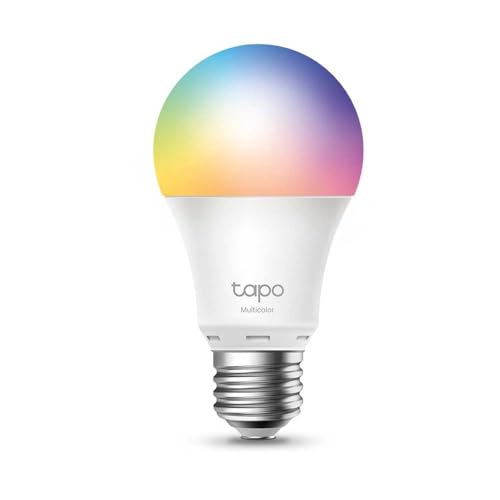
Starting with Wi-Fi? → This is your bulb.
 #1
#1TP-Link Tapo L530E
The easiest Wi-Fi smart bulb on the market. Plug in, open the app, done in 2 minutes. Works with Alexa and Google Home. No hub, no fuss.
Best for:Perfect Wi-Fi starter bulb — no hub, no complexity.
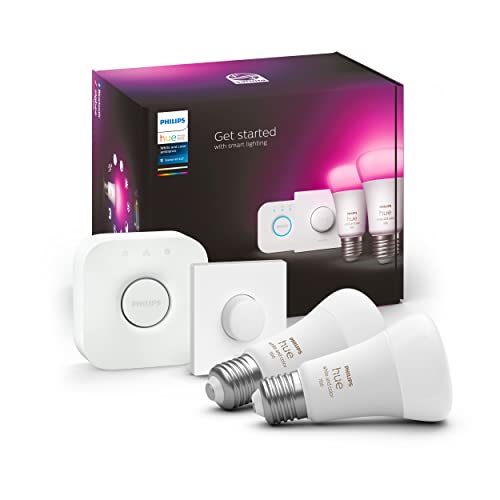
Going Zigbee? → Start with the Hue kit.
 #2
#2Philips Hue Starter Kit
The gold standard Zigbee setup. 2 bulbs + the Hue Bridge included. Local control, rock-solid reliability, and a massive ecosystem to expand into.
Best for:Best Zigbee all-in-one starter — reliable from day one.
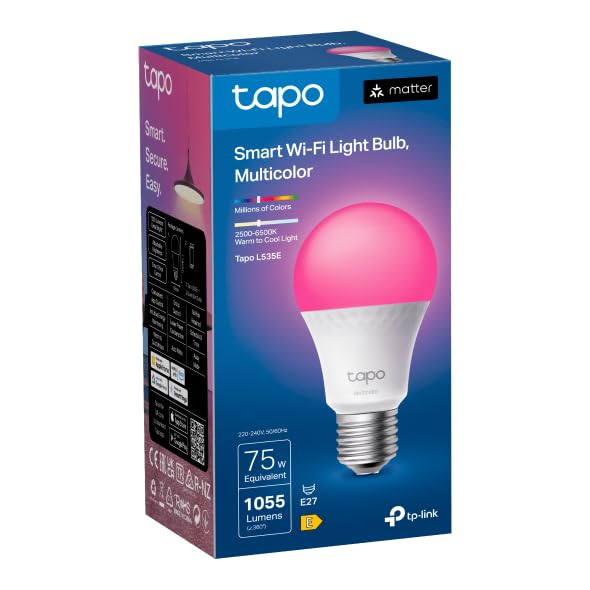
Want Matter? → The L535E is already certified.
 #3
#3TP-Link Tapo L535E
A Wi-Fi + Matter dual-mode bulb. Today it works like any Wi-Fi bulb. Tomorrow it connects natively to HomeKit or Google Home. Zero compromise.
Best for:Best future-proof bulb — Matter-ready, no hub needed today.
Which protocol for which situation
🏠
Small apartment (1–3 rooms)
Wi-Fi is perfect. A few bulbs, no wiring, instant setup. No need for a hub at this scale.
🏡
Full house (4+ rooms)
Zigbee pays off here. Reliable mesh, local automations, and handles expansion without clogging your router.
🍎
Deep Apple ecosystem
Matter via Thread is your friend. Apple TV 4K or HomePod Mini acts as the border router — seamless HomeKit integration.
🤝
Mixed Apple + Google household
Matter is the only protocol that bridges both. Buy Matter-certified and stop worrying about compatibility forever.
🚀 Quick recommendation
Pick one protocol for your first 10 devices. Consistency beats optimization at this stage.
Still not sure which protocol is right for you?
Answer 5 quick questions and get a personalised recommendation — the right protocol, hub (if needed), and starter products for your exact situation.
Find my setup →Free · 60 seconds · No account needed
Frequently asked questions
Can I mix Zigbee and Wi-Fi devices at home?
Yes — but only a hub like Home Assistant or a universal bridge can make them talk to each other. Without one, they live in separate silos.
Is Zigbee better than Wi-Fi?
For reliability and scale, yes. For simplicity and getting started quickly, Wi-Fi wins. Most people should start with Wi-Fi and switch to Zigbee when they hit 10+ devices.
Do I need a hub for Matter devices?
For full local control you need a Thread border router (Apple TV 4K, HomePod Mini, or Google Nest Hub 2nd gen). Some Matter devices also work over Wi-Fi without one.
What is Z-Wave? Should I care?
Z-Wave is another mesh protocol, popular in security systems. It's reliable but has fewer devices and costs more. For smart lighting specifically, Zigbee is the better choice.
Which protocol does Philips Hue use?
Zigbee. The Hue Bridge translates between Zigbee and your home network. Newer Hue bulbs are also Matter-certified when connected to the Hue Bridge.