Smart Home Automations
10 automations that
actually change your life.
Most people set up 0 automations after buying smart devices. Here are the 10 that are genuinely worth the effort — and how to set each one up.
Find my setup →Hallway motion → Automation #1. Morning wake-up light → #2. Bedtime dim → #3. Build from there.
👇 Hallway motion sensor + smart module = your first automation. €25, one weekend, works forever.
Where to start with automations?
I want something useful in the next 10 minutes
Quickest winA schedule or voice command — zero hardware needed.
→ Start with #1 or #2
I want hands-free, truly automatic lighting
Motion sensors that turn lights on and off for you.
→ Start with #3
I want my home to react to my presence
Lights and heating adapt when you arrive or leave.
→ Start with #7
What makes a good automation
⚡
Instant
Good automations are invisible. You shouldn't notice them — the light is just already on when you need it. If you have to wait 2 seconds, something is wrong.
🔄
Set once
The best automations run for months without adjustment. Motion on → light on → motion off → light off in 3 minutes. You set it once and forget it.
🎯
Solves a real problem
Don't automate for the sake of it. Automate the annoying things: the hallway light you always forget, the bedroom light at 7am, the porch when you arrive.
Our tool finds your ideal setup in 60 seconds.
Find my setup →The 10 automations ranked by impact
| Option | Pros | Cons | Best for |
|---|---|---|---|
#1–3: Instant wins🏆 Hallway motion lights |
|
| Every smart home, day one |
#4–7: Real convenience |
|
| After your first week of smart home |
#8–10: Advanced comfort |
|
| When you're ready to go further |
💡 Tip
Build automations one at a time. Master each one before adding the next — this prevents a chaotic setup nobody uses.
Automation #1 for every home.
Hallway motion lights
Set it once, forget it forever. Lights on when you enter, off after 3 minutes. Zero interaction, maximum daily value.
Find my setup →⚠ Automation mistakes to avoid
- 1
Automating too many things too fast
Start with 2–3 automations that solve real problems. Every automation you add is one more thing that can go wrong or need adjusting. Build confidence before complexity.
- 2
Setting up automations without testing
A lights-off at 11pm automation that triggers while guests are still visiting is embarrassing. Test every automation manually before leaving it on. Adjust the timing.
- 3
Motion sensor placement in the wrong spot
A motion sensor in the corner behind a door detects nothing. Mount it 2–2.5m high, angled to cover the main traffic path. The field of view is usually 120°.
- 4
Relying entirely on cloud automations
If your automation only works with internet, it will fail. For critical lights (stairway, bathroom), use local automations via a hub — or at minimum a direct Zigbee pairing.
- 5
No override for manual control
Always keep a way to override any automation. A smart button, a voice command, or a physical switch override. Guests shouldn't have to fight your automations.
⚠️ Common mistake
Don't automate everything on day 1. Complex setups with 20+ automations typically get turned off within a month.
Not sure which one is right for you?
Find my setup →What you need to get started
The minimal kit to unlock the top 5 automations.
Setting up schedules? → This bulb does it natively.
 #1
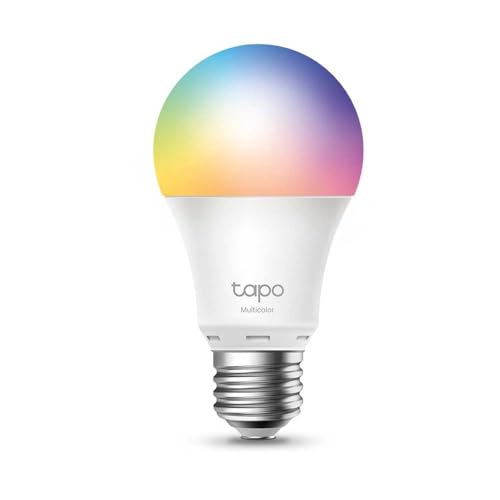
#1TP-Link Tapo L530E
Your automation foundation. The Tapo app supports schedules, scenes, and sunrise simulation out of the box — no hub needed. Start with automations #1, #2 and #5 today.
Best for:Best starter bulb for schedules and scenes — free app included.
Want motion automation? → Add this to your Tapo bulb.
 #2
#2TP-Link Tapo T100 Motion Sensor
Pairs directly with Tapo bulbs over Wi-Fi. Stick it in your hallway, set the 3-minute auto-off, and automation #3 is done. No hub, no wiring.
Best for:Best Wi-Fi motion sensor for beginners — 5-minute setup.
On Hue? → This sensor is the best on the market.
 #3
#3Philips Hue Motion Sensor
For Hue setups, the best motion sensor on the market. Detects presence and daylight. Paired with the Hue Bridge, response is under 100ms — truly instant.
Best for:Best precision motion sensor — for Hue + Bridge users.
The top 5 — step by step
🌙
#1 Bedtime off
Open your smart bulb app → Schedules → Add schedule → 11:00 PM → Turn off → All rooms. Done.
☀️
#2 Wake-up light
Schedules → 6:45 AM → Turn on → 20% brightness → warm white. Increase to 100% by 7:15 AM. Gentler than any alarm.
🚶
#3 Hallway motion
Pair motion sensor with hallway bulb or module → When motion detected → turn on → Auto off after 3 minutes of no motion.
🎬
#4 Movie mode
Create a scene: all living room lights at 15% warm → assign to a physical button or voice command → "Alexa, movie time".
🚀 Quick recommendation
Hallway motion sensor + smart module = your first automation. €25, one weekend, works forever.
Ready to set up your first automations?
Answer 5 questions to get the exact products and automations for your home — with a step-by-step setup plan.
Find my setup →Free · 60 seconds · No account needed
Frequently asked questions
Do I need a hub to set up automations?
For basic schedules and motion triggers, no. Most Wi-Fi smart bulb apps (Tapo, Hue, Shelly) support schedules natively. A hub is needed for cross-brand automations and local (offline) triggers.
What's the most useful automation for a beginner?
The hallway motion sensor. Install a module or smart bulb in your hallway, add a motion sensor, set 3-minute auto-off. You will use this every single day without thinking about it.
Can I run automations without internet?
Only with a local hub (Philips Hue Bridge, Home Assistant, or similar). Wi-Fi cloud automations stop working when your internet is down. Local automations keep running.
How do I set up presence detection?
The easiest way is geolocation in your smart home app (Tapo, Hue, SmartThings). When your phone leaves the home Wi-Fi zone, the 'away' automation triggers. Advanced setups use dedicated presence sensors.
How many automations is too many?
If you're adjusting or troubleshooting automations more than once a week, you have too many. Start with 3–5 solid automations and add more only when those feel invisible.