Beginner's Guide
Start smart home the right way.
No jargon. No overwhelm.
Everyone starts confused. This guide gives you a simple roadmap — what to buy first, in what order, and how to avoid the 5 mistakes everyone makes.
Find my setup →Step 1: buy 2 smart bulbs. Step 2: install the app. Step 3: set one schedule. Done — that's your smart home.
👇 Your first device: a Wi-Fi smart bulb in the room you use most. Everything else follows from there.
Where are you starting from?
Complete beginner — I have nothing yet
Start hereYou want one device that works today, no fuss.
→ Buy one smart bulb. That's it.
I have 1–2 devices but nothing talks to each other
You want to unify your setup and add automations.
→ Focus on protocol consistency
I'm ready to build a full smart home
You want a reliable, expandable foundation.
→ Zigbee hub + starter kit
Smart home in 3 concepts
📡
Protocol = the language
Devices need to speak the same language to work together. Wi-Fi = easy, no extra hardware. Zigbee = reliable, needs a hub. Pick one and stay consistent.
🧠
Hub = the brain
A hub is optional for 1–5 devices. Essential for 10+. It coordinates all your devices locally — automations work even without internet.
⚡
Automation = the payoff
Automations are why smart home is worth it. Lights on when you arrive. Off when you sleep. The goal is a home that anticipates you.
Our tool finds your ideal setup in 60 seconds.
Find my setup →The beginner roadmap — 3 stages
| Option | Pros | Cons | Best for |
|---|---|---|---|
Stage 1: First light (day 1)🏆 Start this weekend |
|
| Total beginners — get a feel before committing |
Stage 2: First room (week 2) |
|
| After your first week — building the habit |
Stage 3: Full home (month 2+) |
|
| When Wi-Fi no longer meets your needs |
💡 Tip
You don't need a full smart home plan before buying your first device. Start small, learn fast, expand naturally.
This is easier than you think.
Start this weekend
Two smart bulbs + one app + one automation. Fully set up in under an hour. No tools, no electrician, no hub.
Find my starter kit →⚠ The 5 beginner mistakes (and how to avoid them)
- 1
Buying 10 devices before testing 1
Smart home is addictive. But buy one bulb first. Live with it for a week. Learn what you actually want before spending €300 on a kit you might not need.
- 2
Mixing protocols without a plan
Buying one Zigbee bulb, one Wi-Fi switch, and one Z-Wave sensor results in 3 separate apps and zero automation. Pick ONE protocol for your first setup.
- 3
Skipping the hub and then regretting it
Wi-Fi is fine to start. But if you find yourself with 10+ devices and flaky automations, add a hub. Don't wait until you're frustrated — plan for it.
- 4
Choosing based on the coolest demo video
Most YouTube smart home setups are €2,000+ rigs. Your goal is a home that works, not a showpiece. Start with a €13 bulb and a €0 app.
- 5
Not setting up a single automation on day one
An unautomated smart home is just an expensive remote control. Set up one schedule (bedtime off) the day you buy your first bulb. It takes 2 minutes and shows you the real value.
⚠️ Common mistake
Don't buy a hub before you have devices that need one. Most Wi-Fi smart devices work completely without a hub.
Not sure which one is right for you?
Find my setup →The perfect beginner starter kit
Recommended in order — buy one at a time.
Step 1 → One bulb, one app, one schedule.
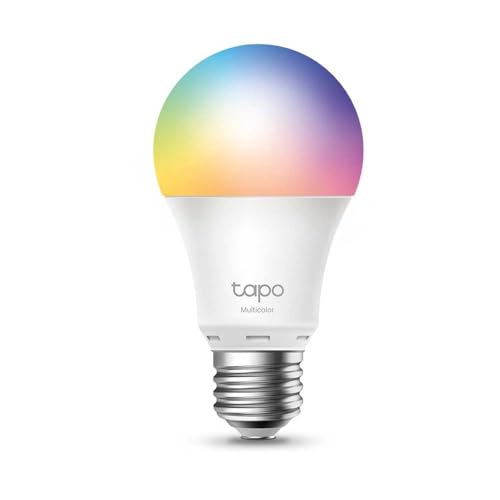 #1
#1TP-Link Tapo L530E
Your first smart device. €13, no hub needed, 2-minute setup. Works with Alexa and Google Home. Sets the foundation for everything else.
Best for:Best first smart bulb — cheapest, simplest, zero commitment.
Step 2 → Motion sensor for the hallway.
 #2
#2TP-Link Tapo T100 Motion Sensor
Your second device. Pairs with any Tapo bulb. Add it to your hallway and set 3-minute auto-off. Your first real automation — done.
Best for:Best second purchase — your first real automation, no hub.
Step 3 (optional) → Upgrade to Zigbee when ready.
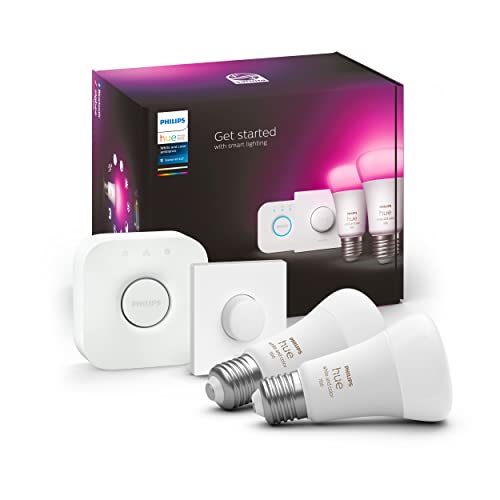 #3
#3Philips Hue Starter Kit
Your step 3 upgrade. When you're ready for Zigbee reliability, this kit includes 2 bulbs + the Hue Bridge. The foundation of a long-term smart home.
Best for:Best Zigbee upgrade — when you're ready to commit.
Your first week with smart home
📅
Day 1
Install your first bulb. Set a bedtime schedule. Use voice control for the first time. That's a complete smart home day one.
📅
Day 3
Add a second bulb in the same room. Create a 'movie' scene at 20% brightness. Start to understand what scenes are for.
📅
Day 7
Add a motion sensor to the hallway. Set auto on/off. Notice how you never think about that light anymore. That's the goal.
📅
Week 4
Decide: is Wi-Fi enough? Or do you want local control and a unified hub? This is when you upgrade intentionally — not impulsively.
🚀 Quick recommendation
Your first device: a Wi-Fi smart bulb in the room you use most. Everything else follows from there.
Want to know exactly where to start?
Answer 5 questions about your home and budget — and get a personalised starter plan with the exact products to buy, in the right order.
Find my setup →Free · 60 seconds · No account needed
Frequently asked questions
What's the cheapest way to start smart home?
One TP-Link Tapo L530E bulb (€13) and the free Tapo app. Works with Alexa and Google Home out of the box. That's a functional smart home for €13.
Do I need to hire an electrician?
For smart bulbs: no. For smart switches or modules: sometimes. Bulbs just screw in. Switches and modules require opening a wall box — most DIY-capable people can do it, but when in doubt, call an electrician.
How long does it take to set up a smart home?
First bulb: 5 minutes. First automation: 2 minutes. First full room: 30 minutes. First full home: a few weekends. Don't rush — the best smart homes are built gradually.
Is smart home worth it for renters?
Absolutely. Smart bulbs require zero installation — screw in and screw out when you move. You take them with you. No damage, no permission needed.
What's the single best smart home investment?
A smart bulb + a bedtime schedule. It costs €13, takes 5 minutes to set up, and runs every night without you thinking about it. That's the best ROI in smart home.