Starter Kit Guide
3 products.
A complete smart home from day one.
Most people buy the wrong first product. Here's the exact starter kit - at three budget levels - that gives you smart lighting, automation, and voice control from the moment you unbox.
Find my kit →Hub-free kit → Tapo bulb + plug + Echo Dot. Zigbee kit → IKEA Dirigera starter. Both are great starting points.
👇 Buy based on the room you'll use first, not what looks most complete on the box.
What's your budget for the starter kit?
Under €50 - I want to test smart home cheaply
Best entry2 bulbs + motion sensor. Real automation, real value.
→ The Budget Kit
€50–150 - I want a solid setup from day one
3 bulbs + hub + motion sensor. The balanced choice.
→ The Balanced Kit
€150+ - I want premium from the start
Hue starter kit + motion sensor + smart button.
→ The Premium Kit
Why these 3 products?
💡
Smart bulb
The foundation. Gives you colour, dimming, schedules, and voice control in the most-used light in your home.
🚶
Motion sensor
The first automation. The hallway light that turns on when you walk in and off when you leave - this is where smart home proves its value.
🔘
Smart button (or voice speaker)
Physical or voice control. A smart button gives every family member a way to control the lights without a phone. A voice speaker does the same hands-free.
Our tool finds your ideal setup in 60 seconds.
Find my setup →Three starter kits - pick yours
| Option | Pros | Cons | Best for |
|---|---|---|---|
Budget Kit (~€35)🏆 Hub-free Wi-Fi kit |
|
| Testing smart home without commitment |
Balanced Kit (~€100) |
|
| Zigbee reliability at mid-range price |
Premium Kit (~€160) |
|
| Long-term smart home foundation - buy once, expand forever |
💡 Tip
You don't need everything from one brand - Tapo bulbs + Shelly plug both work through Alexa without any issues.
Best starter setup for beginners.
Hub-free Wi-Fi kit
No hub, no complexity. Smart bulb + smart plug + voice assistant = fully functional smart home in one afternoon. Under €60 total.
Find my starter kit →⚠ Starter kit mistakes to avoid
- 1
Buying a hub before buying any bulbs
Start with bulbs. A hub with no devices is useless. Buy 2 bulbs first, live with them for a week, then decide whether you need a hub.
- 2
Buying 10 bulbs as a 'starter'
A starter kit is 2–3 bulbs max. You need to learn your setup, your app, your automations. 10 bulbs on day one is overwhelming, not a head start.
- 3
Ignoring the motion sensor
Most starter kits come with bulbs only. The motion sensor is the device that turns smart home from 'remote control' into 'actually automatic'. Include one from day one.
- 4
Mixing protocols in the starter kit
All 3 products in your starter kit should use the same protocol. Don't mix a Wi-Fi bulb with a Zigbee motion sensor - they won't talk to each other without a hub.
Not sure which one is right for you?
Find my setup →Buy your starter kit
The exact products - ordered by budget.
Under €50? → Start with 2 of these.
 #1
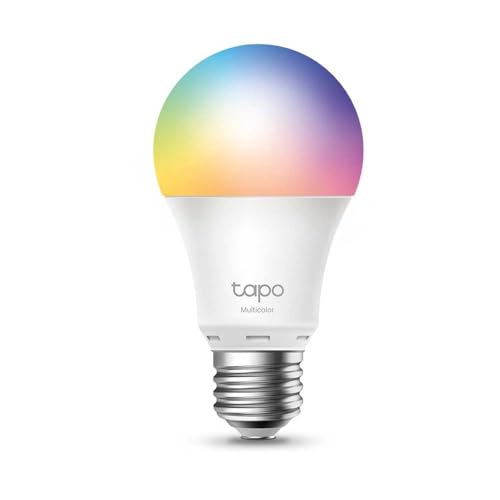
#1TP-Link Tapo L530E (Budget starter)
Buy 2 of these first. Total cost: €26. No hub. Works with Alexa and Google Home. Set a bedtime schedule on day one. This is your foundation.
Best for:Budget starter - 2 bulbs, €26, immediate smart home.
Add this as your third product - it changes everything.
 #2
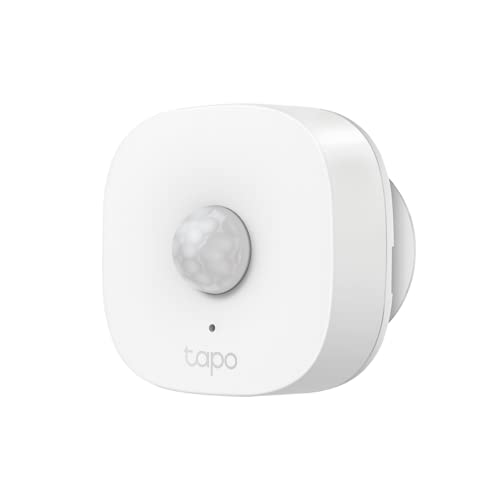
#2TP-Link Tapo T100 Motion Sensor
Add this to your hallway. Pairs with Tapo bulbs over Wi-Fi, no hub needed. Auto-on when you walk in, auto-off after 3 minutes. Your first real automation.
Best for:Best first automation - works with any Tapo bulb, no hub.
Ready to invest? → The Hue kit is a one-time buy.
 #3
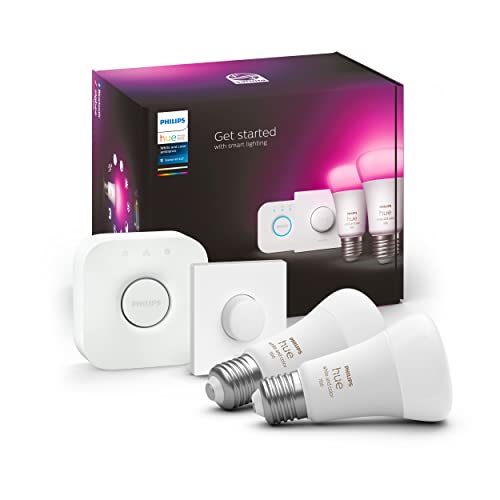
#3Philips Hue Starter Kit
The premium entry. 2 bulbs + Bridge in one box. Local Zigbee control, Matter certified, and a decade-proven ecosystem. The last starter kit you'll ever need to buy.
Best for:Premium starter - everything included, zero compromise.
Day-by-day: your first week
📦
Unbox day
Install 2 bulbs. Open the app. Set a bedtime schedule. You now have a functional smart home.
📅
Day 3
Add the motion sensor to the hallway. Set auto-off after 3 minutes. Notice how you never think about that light anymore.
🎙️
Day 5
Add Alexa or Google Home. Say "turn off the lights" from your couch. This is the moment most people get hooked.
🚀
Week 2
You know what you want. Expand to the next room, or upgrade to Zigbee. Now the decision is informed - not a guess.
🚀 Quick recommendation
Buy based on the room you'll use first, not what looks most complete on the box.
Want the exact starter kit for your home?
Answer 5 questions and get a personalised starter kit - the right products, the right quantity, at your exact budget.
Find my kit →Free · 60 seconds · No account needed
Frequently asked questions
What's the minimum I need to spend to have a real smart home?
€29: one Tapo L530E bulb (€13) + one Tapo T100 motion sensor (€16). That gives you colour lighting, voice control, schedules, and a motion automation. Real smart home for under €30.
Should I buy a starter kit bundle or individual products?
Individual products are almost always better value than bundles. The exception is the Philips Hue Starter Kit - buying the Bridge + 2 bulbs separately costs more than the bundle.
Can I expand the budget kit into a full home later?
Yes - but plan your protocol from day one. If you start with Tapo Wi-Fi, you'll stay Wi-Fi. If you want Zigbee later, you'll need to switch brands. Not a problem, but plan ahead.
Do I need a voice speaker in my starter kit?
No - your phone already has Google Assistant or Siri. A voice speaker is a nice upgrade but not a day-one requirement. Start with app control, add a speaker when you're ready.
How long does it take to set up the budget starter kit?
20 minutes: 5 minutes per bulb, 5 minutes for the motion sensor, 5 minutes to set your first schedule. Total smart home setup time: less than half an hour.
What's the difference between a smart home starter kit and a smart lighting kit?
A smart lighting kit is just bulbs. A smart home starter kit includes at least one sensor or automation device — motion sensor, smart plug, or button. The sensor is what makes it 'smart home' rather than just 'remote-controlled lighting'.
Is the Philips Hue Starter Kit worth the price?
Yes, if you plan to expand past 3 bulbs. The Hue Bridge supports 50+ bulbs, runs locally (no internet needed), is Matter-certified, and has the best-in-class app. For 1–2 bulbs only, Wi-Fi alternatives like Tapo are better value.
Which smart home starter kit works best with Alexa?
The budget Tapo kit is the easiest Alexa setup — just enable the Tapo Alexa skill and all bulbs appear instantly. For Alexa + Zigbee, the Aqara Hub M2 has native Alexa integration without any extra bridge.
Can I start with just one smart bulb?
Absolutely — and it's often the right move. Buy one Tapo L530E (€13), install it in your most-used lamp, and use it for a week. You'll quickly know whether you want to expand or not. Better than buying a full kit and never using it.
Does the starter kit work without a subscription?
Yes. All products in the budget and balanced kits work without any subscription. Tapo, Innr, and Aqara all have free apps with no recurring fees. Only cloud-storage features on cameras require a subscription — bulbs and sensors never do.