Smart Lighting Guide
Bulb, Switch, or Module?
Pick the right one in 2 minutes.
Three ways to make your lights smart. One right answer for your situation. No jargon - just a clear decision you can act on today.
Find my perfect setup →You're renting → Smart bulbs. You own → Smart switch. Already retrofitting → Module. That's it.
👇 Start with 2–3 bulbs in the rooms you use most. Expand only after you've lived with it for a week.
Which option is right for you?
I'm renting or don't want to touch any wiring
Best for 90%You want plug-and-play smart lighting, zero installation.
→ Go with smart bulbs
I own my home and want clean, invisible smart control
You're happy to replace the physical wall switch.
→ Go with a smart switch
I want to keep my existing switches and make them smart
You don't want to change the look of your walls.
→ Go with a smart module
The quick explanation
💡
Smart Bulb
Replace your regular bulb with a smart one. The intelligence is inside the bulb. No wiring, no tools - just screw it in.
🔘
Smart Switch
Replace the wall switch. The switch becomes smart and controls any normal bulb. Requires opening the wall box.
📦
Smart Module
A tiny box hidden behind your existing switch. Your switch looks the same - the module handles all the smart logic invisibly.
Our tool finds your ideal setup in 60 seconds.
Find my setup →Side-by-side comparison
| Option | Pros | Cons | Best for |
|---|---|---|---|
Smart Bulb🏆 Smart Bulbs |
|
| Renters & absolute beginners |
Smart Switch |
|
| Homeowners wanting a permanent setup |
Smart Module |
|
| Retrofits & renovation projects |
💡 Tip
You can combine approaches: smart bulbs in bedside lamps + a module behind the hallway switch. Most homes end up with a mix.
For 90% of people, this is the answer.
Smart Bulbs
Zero wiring, zero tools, works in 5 minutes - and you can take them with you when you move.
See top bulb picks →⚠ Avoid these mistakes
- 1
Turning off the wall switch after installing smart bulbs
Smart bulbs need constant power. If someone flips the switch off, all your automations break. Use a dummy-switch cover or a button scene controller instead.
- 2
Buying a smart switch without checking for a neutral wire first
Most smart switches need a neutral wire in the wall box. Check before you buy - not all older homes have one. Some brands offer no-neutral models.
- 3
Mixing Zigbee, Z-Wave, and Wi-Fi devices without a hub
Each protocol is a separate world. Without a hub like Home Assistant, your devices won't talk to each other. Pick one protocol and stick to it - or get a hub first.
- 4
Buying a full Hue starter kit when you only need 2 bulbs
The Hue Bridge is only worth it at 5+ bulbs. For 1–3 bulbs, Wi-Fi or standalone Zigbee options cost half the price and work just as well.
Not sure which one is right for you?
Find my setup →Our top picks
Here are the best choices for you - simple and reliable. Three products, that's it.
Want the simplest option? → Start here.
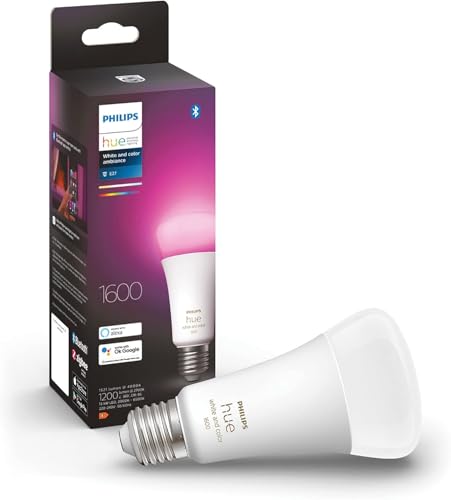 #1
#1Philips Hue White & Color Ambiance E27
The go-to starter bulb. Screws in like a normal bulb, connects via the free Hue app, and works with Alexa, Google Home, and Apple HomeKit out of the box.
Best for:Best for 90% of beginners - install in 2 minutes, no tools needed.
Want to keep your existing switches? → Choose this.
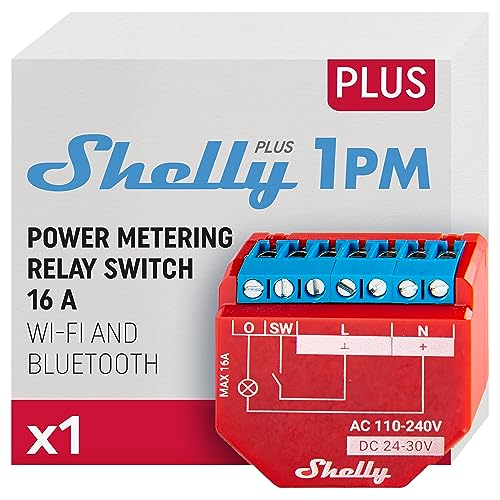 #2
#2Shelly Plus 1PM
A compact Wi-Fi module that fits behind your existing switch. No hub needed - connects directly to your Wi-Fi and integrates with Home Assistant, Alexa, and Google Home.
Best for:If you only do one thing, make it this: keeps your switches, adds full automation.
Already on Zigbee? → Best value module out there.
 #3
#3Sonoff ZBMINI Extreme (Zigbee)
The most compact Zigbee switch module on the market. Fits in even the tightest wall boxes and works without a neutral wire. Pairs with any Zigbee hub.
Best for:Best budget module for Zigbee ecosystems - half the price of competitors.
What works best in each room
🏠
Living room
Smart bulbs in floor lamps + a module behind the main ceiling switch. Best of both worlds.
🛏
Bedroom
Smart bulbs on bedside lamps controlled by phone or voice. No wiring, no electrician.
🚪
Hallway
A smart module on the existing switch. Automate lights on movement - no bulb change needed.
🍳
Kitchen
Smart switch for the ceiling - works with any built-in fixture and looks clean.
🚀 Quick recommendation
Start with 2–3 bulbs in the rooms you use most. Expand only after you've lived with it for a week.
Not sure which one fits your home?
Answer 5 quick questions and get a personalised smart lighting plan - the right products, in the right order, for your exact setup.
Find my perfect setup →Free · Takes 60 seconds · No account needed
Frequently asked questions
Do I need a hub to use smart bulbs?
It depends on the brand. Philips Hue requires its own bridge. IKEA TRADFRI has its own gateway. Wi-Fi bulbs (like TP-Link Tapo or Shelly) connect directly to your router - no hub needed.
Can I still use my physical wall switch with smart bulbs?
Technically yes, but you shouldn't turn it off. The switch cuts power to the bulb, which kills all automations. Replace it with a smart button or a dummy-switch cover that stays on permanently.
What's easier to install - a bulb, a switch, or a module?
Bulb is always easiest: screw in, done. Modules and switches both require opening a wall box. Both may need an electrician if you're not confident.
Can I mix brands?
Yes, as long as they use the same protocol. All Zigbee devices work together on the same hub. Wi-Fi devices usually need their own app but can be unified via Home Assistant.
Which option has the best value for money?
For most homes: smart bulbs in lamps and bedrooms (no wiring), modules in hallways and kitchens (no bulb change). This hybrid approach gives 80% of the smart-home experience for the lowest total cost.
Smart light bulb vs smart switch: which one should I buy first?
Start with a smart bulb. It requires zero wiring, works in any lamp, and you can test smart home in 5 minutes. Once you understand what you want, add a smart switch or module for ceiling fixtures. Bulb first, switch later.
Do smart bulbs work when the wall switch is off?
No — cutting power cuts the bulb. Smart bulbs need constant power to stay connected. The fix: tape the switch in the ON position, use a dummy-switch cover, or replace it with a smart button scene controller that sends signals without cutting power.
What is a smart module and how is it different from a smart switch?
A smart module hides inside the wall box behind your existing switch. Your switch looks and feels the same — but now it also sends smart signals. A smart switch replaces the entire switch face. Module = invisible upgrade. Switch = visible replacement.